 Bookbndr
What you'll do: set the font and size of the headings inside your chapters — the lines you styled as Heading 2 through Heading 6 in Word.
This is the Heading scale section on the Design step. (Chapter titles — Heading 1 — are styled separately, in Chapter opener.)
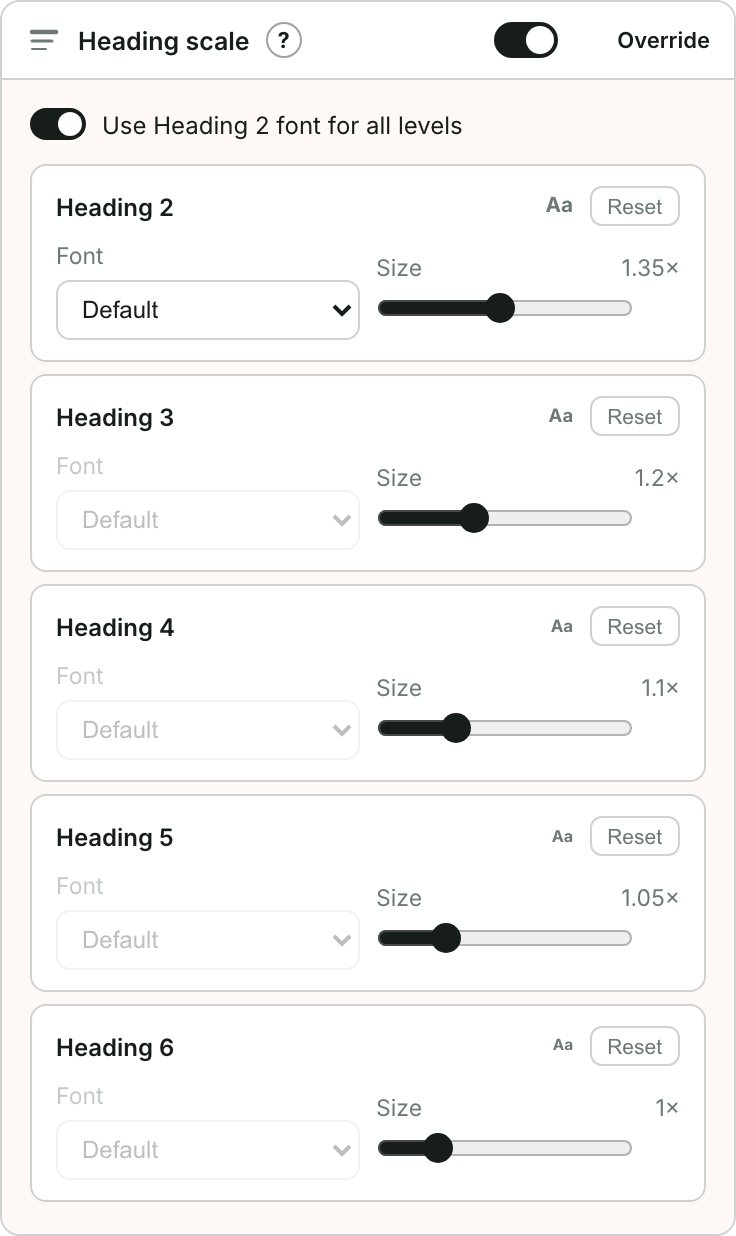
The controls
- Go to Design and open Heading scale.
- Use Heading 2 font for all levels — leave this on for a consistent look: every level uses the Heading 2 font and you only adjust sizes. Turn it off to choose a different font per level.
- For each level, Heading 2 down to Heading 6:
- Font — the typeface for that level.
- Size — a multiplier on the body font size, from 0.75× to 2×. The Aa sample shows roughly how big it will come out.
- Reset — puts a single level back to the theme's values.
Tips
- Keep the sizes descending — Heading 2 largest, each deeper level a little smaller — so readers can tell what nests inside what.
- Sizes are relative to the body text, so your headings stay in proportion if you change the body size later.
- Most novels only ever use Heading 2 or 3; the deeper levels mostly matter for non-fiction.
- Not sure how heading styles work in Word? See Use Word styles to structure your book.