 Bookbndr
In plain terms: Bookbndr reads the headings in your Word document and works out which ones are chapters, which group chapters into parts, and which are smaller sections. You can correct any of its guesses.
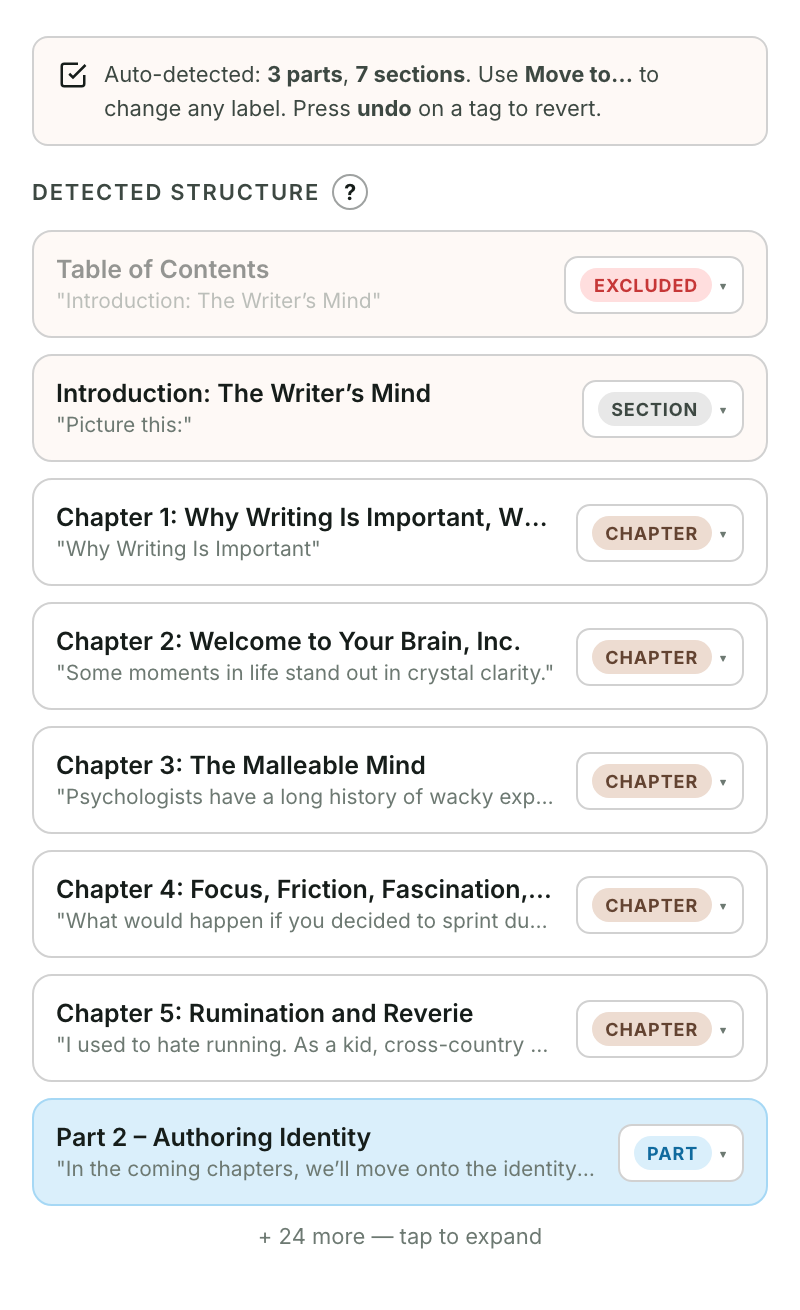
How Bookbndr reads your book
It looks at your Word heading styles:
- A Heading 1 normally becomes a chapter — the main divisions of your book.
- Headings can also be grouped into a part (like "Part One: Beginnings"), which contains several chapters.
- A section is a smaller heading inside a chapter, or a standalone piece that isn't a full chapter.
If your headings aren't styled as proper Word headings, Bookbndr can't find them — so the first fix is always to apply Heading 1 to your chapter titles in Word, then re-scan.
Zones: the label on each heading
Every heading gets a zone — Bookbndr's word for what this heading is. The zones are:
| Zone | Meaning |
|---|---|
| Chapter | A normal chapter in the body of the book |
| Part | A grouping that holds several chapters |
| Section | A sub-heading or minor standalone piece |
| Front / Back | A front- or back-matter page |
| Excluded | Skipped — left out of the e-book entirely |
Fixing a wrong guess
Bookbndr auto-labels everything when it scans, and it's usually right — but if it puts something in the wrong zone, you change it yourself. → Tell Bookbndr which headings are chapters, parts, or sections.