 Bookbndr
What you'll do: build your finished EPUB file and download it, ready to upload to any store.
This happens on the Export step — the last step in the path.
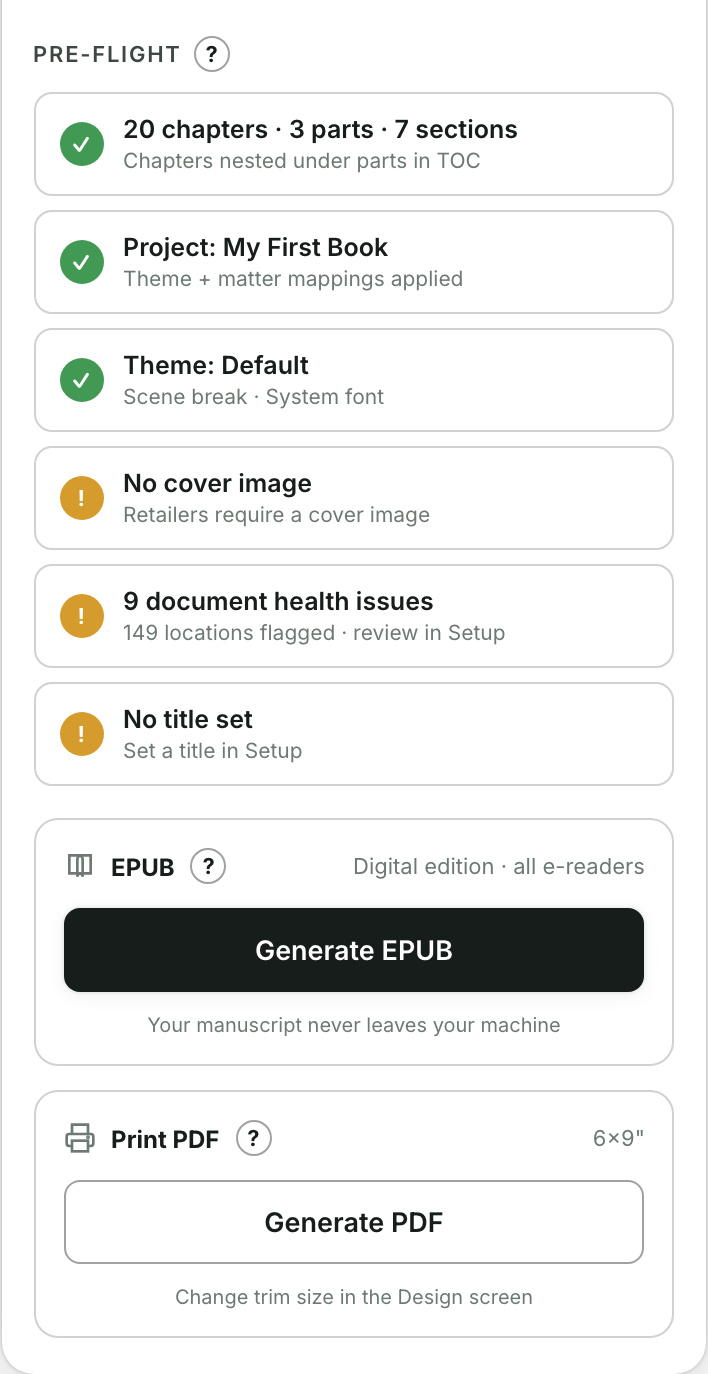
1. Check pre-flight
At the top, the Pre-flight checklist confirms the essentials are in place — title, author, language and a cover. Each item shows a tick, a warning, or a cross.
- A cross means something required is missing. Fix it (usually back on Setup) before exporting.
- A warning is a suggestion, not a blocker — you can still export.
2. Generate
- Press Generate EPUB.
- A progress log shows each step as the book is assembled and packaged. This runs entirely on your own computer — your manuscript never leaves your machine.
- When it finishes you'll see ✓ EPUB ready, with the file name, its size and a note that it passed validation.
3. Download
Press Download EPUB to save the .epub file. That single file is your complete e-book.
What to do with the file
Upload the .epub to Amazon Kindle (KDP), Apple Books, Kobo, Google Play Books or your distributor of choice. If you change anything later, just come back and press Build again.
Also want a paperback?
Bookbndr can produce a print-ready file from the same project too — set your trim size on the Design step first. (See the print PDF how-to, coming in a later help update.)