 Bookbndr
In plain terms: both are notes attached to a point in the text. The only difference is where the note appears.
- A footnote sits at the foot of the same page as its reference. The reader's eye drops to the bottom and back.
- An endnote is collected together at the end of the chapter or the end of the book. The reader flips there to read it.
Which to choose
- Footnotes suit notes you want read in the moment (a quick definition or aside).
- Endnotes keep the page clean and suit dense citations the average reader will skip.
How Bookbndr places them
Bookbndr honors the choice you made in Word:
- Word endnotes always render at the end of the book — in the Endnotes back-matter section when it's enabled, in the conventional spot ahead of the bibliography and index.
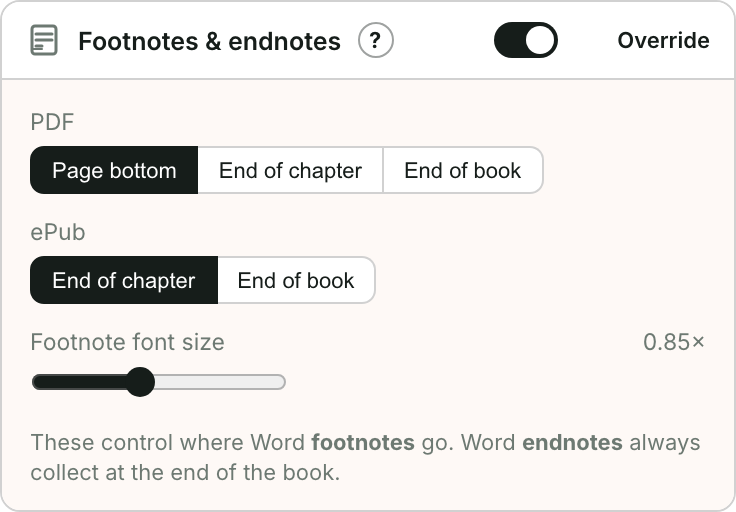
- Word footnotes follow the Notes placement setting on the Design step: bottom of the page (print), end of each chapter, or end of the book.
A manuscript can use both, and each kind keeps its own treatment — page-bottom footnotes and a Notes section at the back.
A note about e-books
True bottom-of-page footnotes don't exist in a reflowing EPUB — there are no fixed pages. So in the e-book every note becomes a tappable link: tap the marker to jump to the note, tap again to return. That's why Bookbndr offers end of chapter / end of book for the EPUB, and the full set (including page footnotes) for the print PDF.
Bookbndr uses the notes already in your Word document — you don't re-type them.
→ To set placement: Place footnotes and endnotes.